Controlled AI
A Customer Asked for a Human: Five AI Handoff Failures to Test
Test the moments an AI conversation reaches your team: the request, paused automation, next owner, preserved context and deliberate return to automation.

Five proposed acceptance tests, not observed Hosqi results. All downloadable cases start as NOT_RUN. No customer conversation or channel delivery was tested.
A customer asks for a person. The bot says it will connect them, but nobody replies—or the bot carries on asking questions. The problem may sit between the conversation, the inbox and the team's ownership rules.
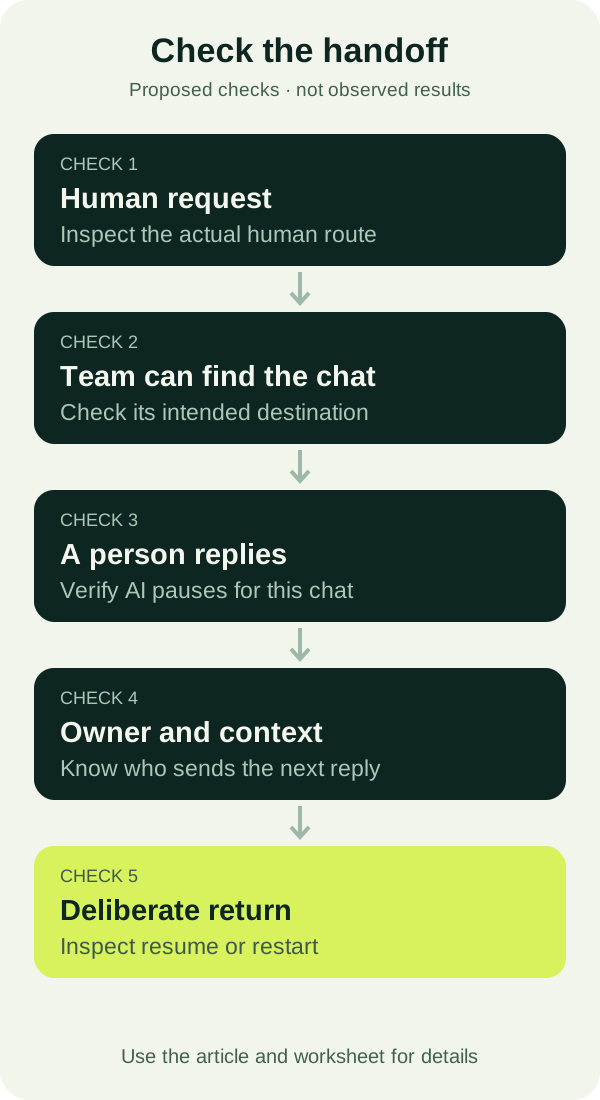
When an AI chatbot's human handoff is not working, test the whole transfer: the request, the automation state, the next owner, the conversation history and the return to automation. A reassuring message alone does not show that those steps happened.
These five proposed tests focus on that transfer. They have not been run against a Hosqi workspace. Download the handoff test cases; every result starts as NOT_RUN.
Prepare a conversation your team can inspect
Choose one workflow and one intended handoff destination. Agree who will handle the test, who covers an unavailable colleague and what should allow automation to resume. Use synthetic customer details and an isolated draft first.
Keep one short example throughout the tests: a customer has asked about a service, supplied a preferred day, then requested a person to discuss an exception. The service and day are test data, not a real booking or customer story.
Hosqi's public handoff guide describes choosing a human route, reviewing history and agreeing on ownership. Its shared inbox description describes a waiting-for-team status, pausing automation when a person replies and controls to resume or restart. Those descriptions provide a starting point for your checks; the results must come from your configured conversation.
1. The explicit request for a person is missed
Failure to look for: the AI continues collecting details after “I want to speak to a person,” or sends a handoff message without reaching the intended inbox route.
Start while the AI is still waiting for a detail. Send that exact request. Then repeat in a separate conversation with a natural variation, such as “Can someone on your team help me?” Keep the wording in the result sheet so you know which version failed.
Inspect the conversation and the inbox together. Did the workflow take its human exit? Can the intended team find the chat? Is the next step clear to the customer? In Hosqi, check the actual state associated with Needs your team, rather than relying on the bot's last sentence.
The public AI conversation description includes handing over when the customer requests a person. Your acceptance requirement should therefore cover the route as well as the wording. Avoid promising that someone is already answering unless that is true.
If the test fails, review the human exit and its destination before editing the acknowledgement. A better sentence will not repair a missing route.
2. AI keeps replying after human takeover
Failure to look for: a teammate replies, but a later customer message triggers another automated answer in the same conversation.
Use the conversation handed over in the first case. Have the designated teammate open it and send a clearly identified test reply. Next, let the tester ask a follow-up question. Check whether AI remains paused while the teammate handles the issue.
Record the message order and the automation state. Two answers close together can be hard to interpret without knowing which message triggered each one. If an automated response arrives, keep its timestamp and identify the workflow responsible before deciding what to change.
Hosqi's shared inbox page describes pausing automation for that chat when a person replies. Treat that as behavior to verify in the configured workflow, including the next inbound message. Taking a conversation out of one list or adding a note should not be assumed to have the same effect as a human reply.
If a second workflow or queued message might be involved, investigate it separately. Do not mark the case passed while duplicate replies remain unexplained, and do not assume an instruction in the AI prompt controls every sending path.
3. Nobody owns the next reply
Failure to look for: the chat reaches a team queue, but each teammate assumes somebody else will answer it.
First test the normal route. After the handoff, ask the receiving teammate to find the conversation and identify who is responsible for the next customer-facing reply. A queue can be a valid destination, provided someone is responsible for monitoring it and claiming the work.
Then repeat with the usual teammate deliberately unavailable in the test arrangement. Ask the covering person to follow your agreed procedure. Does the conversation remain visible? Can the colleague take responsibility without guessing who was already handling it?
Hosqi's handoff guide explicitly recommends agreeing on ownership and dealing with an unavailable colleague. Its inbox description covers assigning conversations to people or team queues. This test checks the procedure you have configured around those capabilities; it does not assume an automatic fallback or a response-time guarantee.
Write the expected owner in the test sheet before starting. If the result is “everyone can see it,” ask one more question: who will send the next reply? For a sample daily ownership routine, use the small-team shared inbox workflow.
4. The person loses the original context
Failure to look for: the receiving teammate can open the chat but cannot work out what the customer needs, what was already answered or which detail remains unresolved.
Give the test conversation a short history: the requested service, a preferred day and an exception that needs a person. Ask the receiving teammate to read it before responding. They should be able to identify those three points from the available history and relevant fields, without asking the tester to start over.
Add a short internal note if a colleague needs a clear next action. For example: “Customer prefers Tuesday; needs a person to confirm the exception. No booking confirmed.” This is a synthetic note to adapt, not an automatically generated summary or a record of a real appointment.
Check the note's destination as well as its content. A team-only note must not become a customer message. Hosqi's public guide distinguishes internal notes from the customer-facing conversation; verify the control you use before entering information intended only for colleagues.
If context is missing, record exactly what the person could not see. Do not replace missing history with a confident guess. This case passes when the teammate can continue the actual request and explain the next step accurately.
5. Automation resumes before the human task is complete
Failure to look for: another customer message restarts automation while the teammate is still resolving the issue, or an intentional restart sends the customer through an unsuitable opening flow.
While the person still owns the test conversation, send a further message from the tester. Confirm that it follows the intended human-owned state. Then complete the sample task and have the responsible teammate use the appropriate resume or restart control deliberately.
Before doing so, write down the expected next step. Continuing an unfinished request and starting a new workflow are different decisions. A deliberate restart may repeat questions; decide whether that is appropriate for this conversation instead of treating any bot reply as success.
After the chosen control is used, send the next test message and inspect the path taken. Does it preserve the facts the workflow is meant to keep? Does it avoid claiming that an unresolved exception or unconfirmed booking has been completed?
Hosqi publicly describes both resume and restart controls. It does not establish that AI will automatically choose the right moment to return. Your team needs an agreed completion rule and evidence that the selected control produces the intended next step.
Keep evidence for each transition
The downloadable CSV has one row for each core case, including the starting state, customer input, expected owner, AI state and context. Leave observed_result and evidence blank until you run the case. If you test a wording variation or another workflow, copy the row and record that setup separately.
For each run, retain the workflow version, relevant conversation reference, tester and time in your approved test record. Capture the actual message sequence, owner or queue and automation state. Use only permitted evidence with personal information removed.
Mark PASS only when you can inspect the expected outcome. Use FAIL for a demonstrated mismatch, BLOCKED when access or visibility prevents a conclusion, and NOT_RUN before testing. An unobserved state is an evidence gap, not a pass.
Private simulation can help check a draft's branches. Hosqi's first-workflow guide distinguishes that from checking external actions. Arrange a separate, authorized channel conversation to verify that the intended inbox receives the messages and the tester receives the human reply. A preview alone does not prove channel delivery.
Correct the failed route, ownership rule or control, then repeat the affected case and its neighboring transitions. Keep the earlier observation so the retest shows what changed. For broader checks of knowledge, uncertainty and business actions, use the 20-case AI support checklist.
Start with one conversation and one responsible teammate. Use Hosqi's shared inbox and handoff guidance to prepare the route, then gather the five results before extending it to more workflows.
Downloads
Editable working files from this article. They contain fictional examples only.
Sources
Hosqi product statements in this article are based on these public pages, read on the dates shown.
About this article
Hosqi is the organizational author of this article. Examples and names in it are fictional unless a source says otherwise.