Team operations
How a Small Team Can Organize a Shared Inbox Without Losing Ownership
Give each customer conversation one owner, a clear next action and a useful handoff note. Includes a shared inbox workflow and editable templates.

Editorial guide with fictional examples and a proposed team procedure; no measured customer results.
Two teammates answer the same Instagram message while a booking request waits in another channel. A shared inbox puts those messages in one place, but your team still needs a clear rule for who answers next.
For a small team, start with one conversation owner, a visible next action and a short handoff note. Those three habits make it easier to continue a conversation without asking the customer to explain everything again.
This guide gives you an operating procedure and an editable ownership sheet. It is a proposed workflow for a small team, not a customer case study or a measured promise about response times.
Give each conversation one next-response owner
A conversation can involve several people. One person should still be responsible for its next customer-facing reply.
The owner does not have to solve every problem alone. They are responsible for answering, finding the right colleague or setting a clear expectation while the answer is being checked.
Use three roles, even when the same person sometimes fills more than one:
| Role | Responsibility | When responsibility changes |
|---|---|---|
| Inbox coordinator | Check new and unassigned messages; make sure each actionable conversation has an owner | When a teammate accepts the conversation |
| Conversation owner | Send the next reply, collect missing information and keep the next action current | When another teammate explicitly accepts a handoff |
| Backup | Cover an unavailable owner and review work that reaches a shift boundary | When coverage is accepted and made visible in the conversation |
These are operating roles, not additional Hosqi permission levels. Your existing account permissions still determine what each teammate can do.
For a two-person business, the coordinator might be whoever opens the inbox first that morning. For a larger team, rotate that duty. The important part is making coverage visible rather than expecting everyone to watch every channel all day.
Separate ownership, topic and next action
Those three questions need different answers:
- Owner: Who is responsible for the next reply?
- Topic: What is the customer asking about?
- Next action: What needs to happen before the conversation can move forward?
An assignee can identify the owner. A small label set can identify topics such as Booking, Product question or Needs a decision. An internal note can explain the next action and any promise made to the customer.
Avoid using a label such as Maya as your only ownership system. Labels can accumulate, and an old label may no longer reflect who has accepted the work. Use the conversation's assignment control for ownership when your inbox supports it.
Hosqi's shared inbox includes assignments, labels, filters and internal notes. Its handoff guide describes agreeing on ownership and preserving the conversation history. The procedure below explains how a team can use those tools together; it does not introduce a separate automatic routing feature.
Follow the same five steps for an actionable message
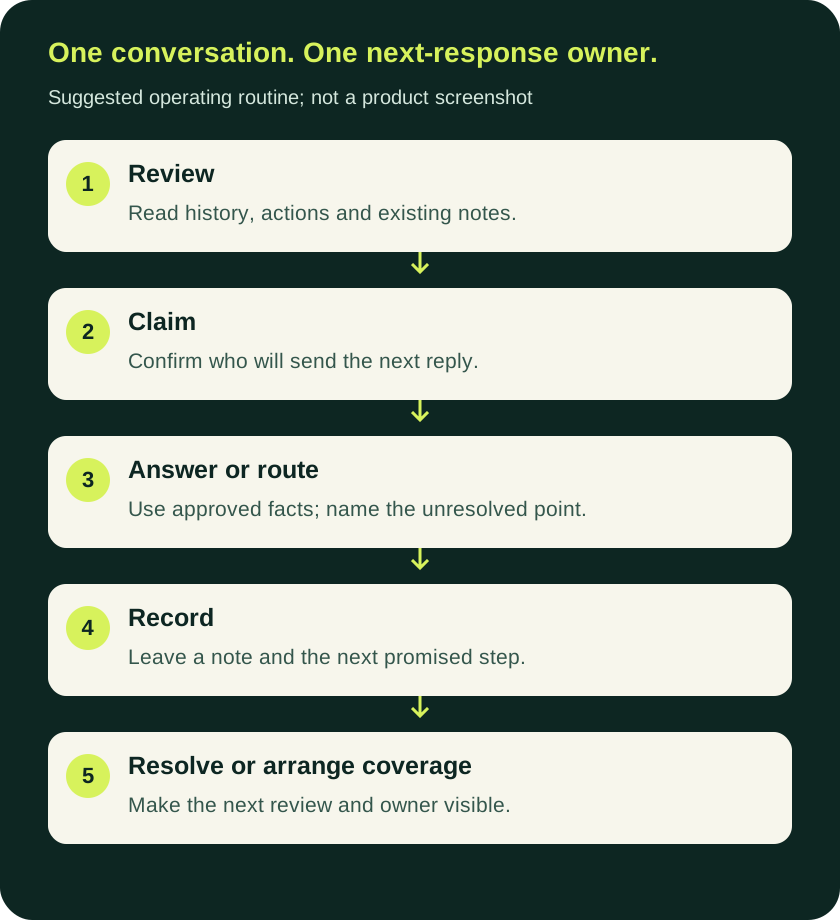
1. Read the current conversation before replying
Check what the customer has already said, whether someone has answered and whether there is a note about work in progress.
A short message such as “Tuesday works” can be meaningless on its own. In the full conversation, it may be a preferred appointment day rather than confirmation that an appointment has been reserved.
If the message arrived through an automation, check what that automation actually completed. Collecting a preferred day and successfully reserving a calendar slot are different outcomes.
2. Claim the conversation before starting the answer
Assign it to yourself or confirm the existing owner before drafting a substantive reply. If you cannot take responsibility, route it to the coordinator instead of leaving an ambiguous “someone should answer this” note.
Agree on how the team handles simultaneous replies. The working rule can be simple: check the assignee and latest message before sending. Do not assume that merely opening a chat reserves it for you.
3. Answer, or route it with a specific reason
Answer a routine question when you have current, approved information. If the request needs a decision, an exception or information you do not have, say what is being checked and route it to someone who can act.
For example:
“I’m checking whether that appointment can be moved. Maya will continue here once she has reviewed the available options.”
Use a time commitment only when your team can keep it. “We will reply within five minutes” should not be a default template for an inbox nobody monitors outside working hours.
4. Leave a note that supports the next decision
Write the note for the person who will continue the work. Include the customer's goal, the exact unresolved point, what has already been done and the next promised step.
A useful note might read:
Customer goal: Move an existing appointment to Tuesday afternoon.
Already done: Collected the preferred day; no reservation has been changed.
Open point: Check the calendar and offer an available slot.
Next owner: Maya, once she accepts.
Customer expectation: We are checking availability; no appointment is confirmed yet.
This is a fictional example. Use the customer's actual words and the real action result in a live conversation. A summary should help someone find the relevant history, not replace that history.
Use an internal note for colleague-only information. Check that you are writing a note rather than a customer reply before sending it.
5. Resolve it, or make the next review explicit
Close the conversation when its task is complete. If it must stay open, record the next action and who will review it.
“Waiting” is not enough on its own. Waiting for the customer, waiting for an internal decision and waiting for an external action need different follow-up decisions.
Choose the statuses and labels that your inbox actually offers. You do not need to create a complicated status system to make the distinction clear.
Use a small ownership sheet while the routine becomes familiar
Download the editable ownership sheet and adapt the sample rows to your team. Keep customer information in your approved workspace; the download contains fictional examples only.
The sheet asks for:
- A conversation reference and channel.
- The accepted owner.
- The customer's goal.
- The next action and review point.
- What the customer has been told to expect.
- A pointer to the original conversation.
The sheet is a planning aid. Once the team follows the routine consistently, keep operational ownership in the inbox rather than maintaining a second, conflicting customer database.
There is also a handoff-note template you can copy into your team's internal notes.
Set a rule for the end of a shift
Before leaving, each owner should review unresolved conversations and decide whether to finish the next reply, transfer ownership or leave a clear next-review instruction.
A handoff is complete when the receiving person has accepted it. Until then, the current owner or coordinator remains responsible for arranging coverage.
If nobody is available, tell the customer when the team is expected to return using your actual service hours. Do not describe an unmonitored queue as live support.
Check what happens when AI and a person share the conversation
If a customer asks for a person, your team needs to know where that conversation appears, who will find it and what happens to automated replies.
Hosqi's public shared-inbox description explains that replying yourself pauses automation for that conversation, with controls to resume or restart it. Review the configured workflow and test that behavior in your own permitted environment before relying on it for customer coverage.
Check these points together:
- A request for a person reaches the intended human route.
- The responsible teammate can find the conversation and read its history.
- The AI does not continue replying while the teammate is handling it.
- Automation resumes only through the return path your team has agreed on.
The 20-question AI support test checklist gives you a broader set of cases to run before activation.
Review your process using conversations, not assumptions
Look at a small, permitted sample of your team's conversations. Check for actionable messages with no owner, replies sent twice, handoffs nobody accepted and promises that were not recorded.
Measure each issue separately. A faster first reply does not tell you whether the question was resolved, and a closed conversation does not necessarily mean an appointment was confirmed.
Change the routine when you find a repeatable problem. If ownership is clear but answers are still wrong, review the business information or workflow instead of adding more labels.
To put the routine into practice, explore Hosqi's shared inbox, then use the setup guides to check your channel, workflow and human route.
Downloads
Editable working files from this article. They contain fictional examples only.
Sources
Hosqi product statements in this article are based on these public pages, read on the dates shown.
About this article
Hosqi is the organizational author of this article. Examples and names in it are fictional unless a source says otherwise.