Controlled AI
Why AI Customer Replies Get Business Facts Wrong—and How to Diagnose the Source
Trace a wrong business answer to an approved fact, a current source and the AI step that can use it. Includes an editable diagnosis ledger.

A proposed diagnosis method with fictional examples and unrun test cases. No customer incident, AI benchmark or live product result is claimed.
When an AI chatbot gives wrong answers about your business, start with the fact it was supposed to use. A fluent reply can still quote old opening hours, miss a condition in a policy, or answer for the wrong location.
Before you rewrite a prompt, collect the customer's exact question, the approved answer and the source that supports it. That small record helps you separate a content problem from a source-selection problem or a workflow problem. Each needs a different correction.
This guide is for the person responsible for a small business's customer replies. It provides a diagnosis method and an editable worksheet. The examples are illustrative; they are not reports of a Hosqi customer incident or results from an AI test.
Start with one question and an approved fact
Choose one reply that you can check. A broad complaint such as “the bot gets our hours wrong” leaves too much room for interpretation. Record the question as it arrived, including useful context such as the branch, service or date it refers to.
Then write the answer your business is willing to stand behind. Include its scope:
- Which location or service does the fact apply to?
- Is it the normal policy or an exception for a particular date?
- Who can confirm that the source is current?
- What should the assistant say if the question does not identify the relevant location?
For example, “Are you open on Saturday?” may need a location before it has a safe answer. The right acceptance criterion could be a clarifying question rather than an opening time. Do not grade the assistant against a fact that the question does not identify.
Use an approved business document or a page maintained by the person responsible for that policy. A previous AI reply is an observation to investigate, not an authority for the next answer.
Separate missing, stale, conflicting and unavailable information
The same wrong reply can have several plausible causes. Keep the possibilities separate until you have evidence.
| Possible cause | What to look for | First correction to try |
|---|---|---|
| Missing fact | The relevant source never states the answer or a necessary condition. | Add the approved fact and its scope to the maintained source. |
| Stale fact | The business changed, but a page or uploaded document still describes the old policy. | Correct the source and complete the applicable refresh process. |
| Conflicting facts | Two sources describe the same location and situation differently. | Ask the policy owner to resolve the conflict and retire the obsolete version. |
| Unavailable or unselected source | The fact exists somewhere, but the relevant AI step cannot use that source in this workflow. | Check readiness and source selection for the step that answers the question. |
| Answer or workflow problem | The relevant information appears ready and selected, but the response still fails the acceptance criterion. | Inspect the step's instructions and route, then retest the precise case. |
Treat these as working diagnoses. Finding an old document does not prove that it caused the reply. Likewise, finding the correct fact on your website does not prove that the answering step used it.
Avoid correcting all five possibilities at once. A large rewrite can hide the original cause and make a later regression harder to explain.
Trace the fact to the AI step that answers
Follow the customer's question through the actual workflow. Identify the step that produced the reply and check the sources available to that step. Do not stop at a list of everything uploaded to the workspace.
Hosqi's AI chatbot description explains that businesses confirm source material and choose sources for individual AI steps. Its knowledge setup guide also describes preparing current material and checking source readiness. Those descriptions give you places to inspect; they do not prove that a particular customer reply used a particular passage.
For the answering step, record:
- The workflow and step you inspected.
- The source selected for that step.
- The source's actual content, including the relevant condition or exception.
- Its readiness and refresh state, as shown in your current workspace.
- The fact or question that is still missing, if the source cannot support an answer.
Hosqi's AI and knowledge FAQ says a website source covers a single page and needs a manual refresh. Updating another page or a live website does not establish that a previously collected source is current. Check the exact source you selected and the refresh method that applies to it. Do not assume a whole website was imported or that later website edits were picked up automatically.
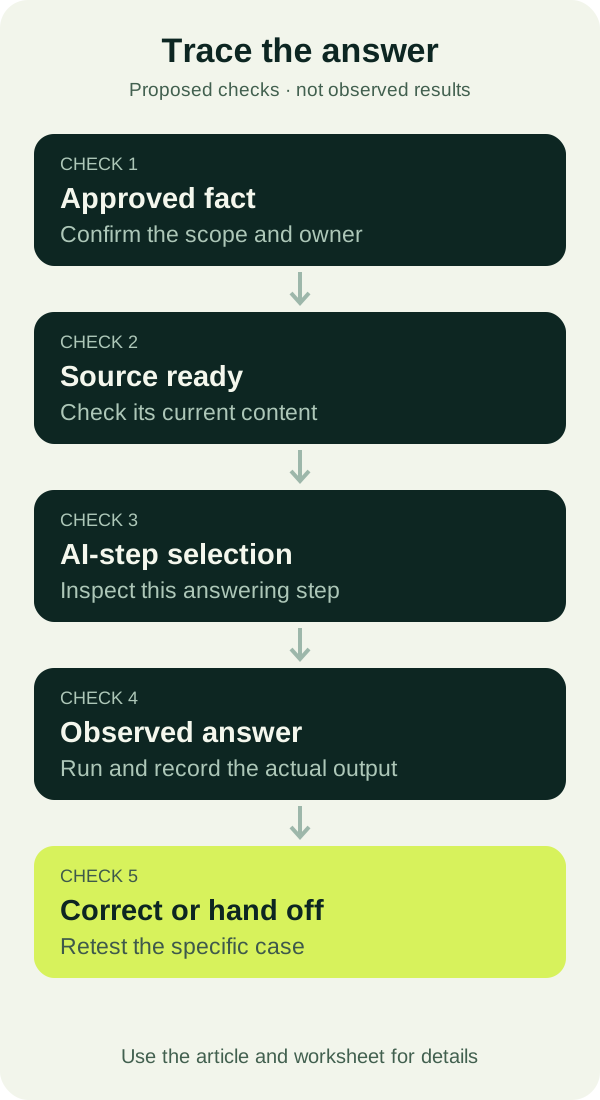
The diagram is a proposed review process. It does not describe a hidden model trace or a native Hosqi monitoring screen.
Resolve a source conflict before asking the AI to choose
Consider this fictional business with two documents. The values below illustrate a source conflict; they are not facts about a real customer or observed AI output.
| Document | Scope | Saturday policy | Editorial status |
|---|---|---|---|
| Archived general schedule | All branches | Closed | Retired |
| Approved branch note | Riverside branch | Visits by appointment | Current |
For “Can I walk into Riverside on Saturday?”, the proposed answer criterion is to explain that a visit requires an appointment. It is not to confirm a booking. Both documents contain a plausible policy, but only the current branch note describes the intended situation. No test has been run in this example.
The content owner needs to decide which document governs that question. Record the decision in the maintained source: branch, effective period, exception and owner. Remove or clearly retire material that no longer applies. Keep genuinely different policies separate and label their scope.
Adding a vague instruction such as “always use the latest information” leaves the underlying ambiguity unresolved if the sources do not establish what is current. A date in a filename can be useful context, but it does not by itself establish that a policy is approved or still valid.
When the approved sources still do not support an answer, define a useful next step. That might be asking which branch the customer means or collecting a question for a teammate. It should not be a confident guess.
Keep a diagnosis ledger instead of a collection of screenshots
Use the business-facts diagnosis ledger to keep the question, source and correction together. Every row starts with NOT_RUN; the file contains proposed checks, not successful results.
The worksheet separates these fields:
question: the exact test question, including its scope.source_urlandsource_revision: the source you inspected and the version, date or other identifier available to you.approved_fact: the answer or condition confirmed by the business owner.observed_answer: the actual output, filled in only after a test.diagnosisandnext_action: the current explanation and the smallest correction to test.status: whether the case has run and whether it met your acceptance criterion.
Use a controlled test question rather than copying a customer's personal details into a general worksheet. Preserve the meaning needed for the test. Keep any necessary private conversation evidence in the place your team normally uses for that purpose.
The ledger is useful even when the diagnosis remains uncertain. “Source corrected; answer not yet retested” is more actionable than an unsupported “fixed.”
Test the correction at the right level
After a source or workflow change, repeat the original question and compare the answer with the approved criterion. Then add a few closely related checks:
| Check | What it helps you examine |
|---|---|
| Original wording | Whether the case that triggered the investigation now meets its criterion. |
| Same question phrased differently | Whether the response depends on one convenient wording. |
| Missing location or date | Whether the assistant asks for the information needed to answer. |
| An unsupported exception | Whether the assistant acknowledges a limit instead of inventing a policy. |
| A request for a person | Whether the human-help route behaves as intended. |
These checks are a starting set, not an accuracy benchmark or a guarantee about every future reply. Save actual outputs and leave unrun cases marked accordingly. If the same approved case gives inconsistent answers, record that variation and investigate it before calling the correction complete.
Choose the test mode deliberately. Hosqi's workflow builder description distinguishes a private simulation from an optional real-AI preview. Simulation can help inspect the route, but simulated AI output does not establish how the real model answers the question. A real-AI preview can help examine the answer, but it does not establish delivery through a customer channel. Use an authorized test conversation when channel behavior is part of the question, and inspect the actual result.
Check the boundary between an answer and an action
Some apparently wrong answers are promises about work that has not happened. “Your appointment is booked” is a different claim from “I have the details for your appointment request.”
Hosqi's product description separates the AI conversation from explicit workflow steps that perform external actions. When a reply claims a booking, update or other action, verify the action's result as well as the wording. Collecting the customer's details does not prove that an external system accepted them.
Keep the acceptance criterion specific: what may the assistant say before an action, what result is needed to confirm it, and what should happen if the action fails? If you are diagnosing a wrong business fact, this check prevents a source correction from masking a separate action-status problem.
Close the case with evidence and a named next step
A useful completion note identifies the original question, the approved fact, what changed and the tests that actually ran. Include any remaining limitation. Do not turn a single successful answer into a claim that the entire assistant is now accurate.
For a wider set of proposed checks, use the 20-question AI support bot checklist. If a case needs a teammate's decision, the shared inbox ownership guide provides a way to keep the next response assigned.
Start with one recurring wrong answer and fill in its approved fact and source in the diagnosis ledger. Then follow the Hosqi knowledge setup guide to inspect the material available to the relevant AI step.
Downloads
Editable working files from this article. They contain fictional examples only.
Sources
Hosqi product statements in this article are based on these public pages, read on the dates shown.
About this article
Hosqi is the organizational author of this article. Examples and names in it are fictional unless a source says otherwise.